Choosing Components For Personal Deep Learning Machine
A Guided Approach towards building a Personal Deep learning machine.
Hi Everyone!
As a Hobbyist, the cost of EC2 Instances for running an experiment has been a barrier in exploring and solving Deep Learning Problems. Reserved Instances were my initial playground as I was not familiar with the cloud ecosystem.
Eventually, Spot instances became my alternative to run well-structured experiments. But often times, I found it very difficult to setup and run experiments. The main problem comes when setting up the environment for backing up and restoring the data/progress. Thanks to Alex Ramos and Slav Ivanov for the Classic and 24X7 versions of the EC2 Spotter tool which came in handy when dealing with spot instances. (Try them out if you still use Spot Instances!)
After using AWS EC2 instances for around 6 months, I realized that the long-term cheaper alternative is to invest on a local machine. This allows me to gain more by having better control over the experiment and with similar or better performance. On detailed survey throughout the internet, I couldn’t find any difference of opinion regarding the local machine idea when it comes to long term usage. Hence, I started to research on choosing components for my local deep learning build.
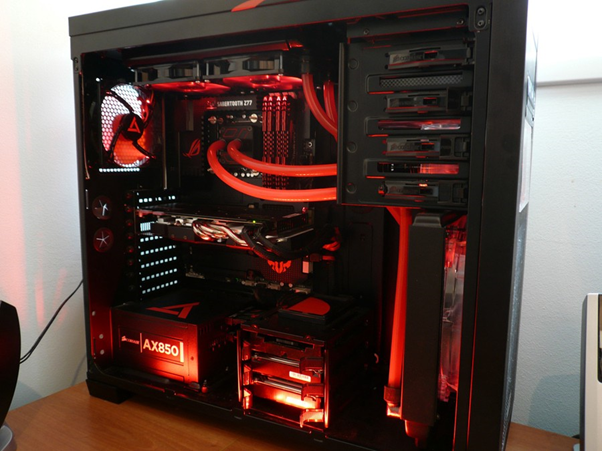
Selection of components for Deep learning is a huge puzzle that intrigues many beginners who try to get their build. It requires the user to have some basic knowledge to build a system that can meet the required performance for the cost involved.
This post tries to help fellow readers to get started with the selection of components and understand the parameters before choosing the product.
So! Lets get Started!!
First things First! You must finalize on the maximum number of GPUs that you plan to have on the newly built system. If you’re an active machine learning researcher then you might probably want more GPUs. This can help you run more than one task in parallel and try different variations of model architectures, data normalization, hyper parameters etc. in parallel.
My Recommendations: If you are a researcher/Student/Hobbyist Consider for a Dual GPU Build. If you plan to run huge models and participate in insane contests like ImageNet which require heavy computation, consider for a Multi GPU Build.
Once you have arrived at a conclusion on the type of build you can arrive at the number of PCIe lanes required:
- Dual-GPU Build (Up to 2 GPU): 24 PCIe Lanes (Might Experience Performance Lag when using SSD that share PCIe lanes or when Both GPU are used)
- Multi-GPU Build (Up to 4 GPUs): 40 to 44 PCIe Lanes
Why PCIe lanes first? In practice, there will be a bottleneck to keep data flowing to the GPU because of disk access operations and/or data augmentation. A GPU would require 16 PCIe lanes to work at its full capacity.
This post will address only about Dual-GPU System. There will be a follow-up post about the Multi-GPU Build.
Dual-GPU Build
1) Motherboard
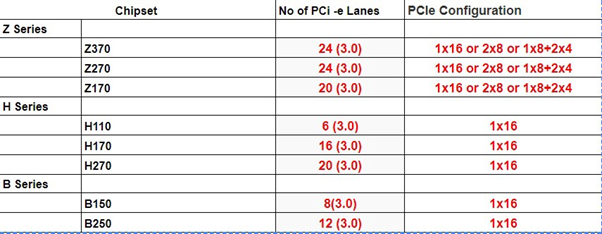
Once the PCI-e Lane requirement has been decided, We can now choose the Motherboard Chipset. Ideally a GPU, to perform at its full capacity requires 16 PCI-e Lanes.
Chipsets like B150, B250, H110, H170, H270 support Intel processors, but they are seldom used for deep learning builds since the number of PCIe lanes will not be enough.
Preferred chipsets:
- Z170 — Support both 6th/7th Gen Intel Processor. Usage of 7th Gen might require a BIOS Update.
- Z270 — Support both 6th/7th Gen Intel Processor. (Latest)
- Z370 — Supports 8th Gen Intel Processor.
Things to Keep in Mind:
- Form Factor (i.e ATX, Micro ATX, EATX etc.)
- No of PCIe Slots (Minimum 2 Slots)
- Maximum RAM Supported (64 GB Preferred)
- No of RAM Slots (Minimum 4 Slots)
- SSD and SATA Slots
2) Processors
The choice of CPU might further dependent on GPU. For Deep learning applications, the CPU is responsible mainly for data processing and communicating with GPU. Hence, the number of cores and threads per core is important if we want to parallelize all that data preparation. It is advised to choose a multi-core system (Preferably 4 Cores).
Things to Keep in Mind:
- Socket Type
- No of Cores
- Cost
- Some processors may need their own Cooler Fan.
3) Memory or RAM
Size of the RAM decides how much of the dataset you can hold in memory. For Deep learning applications it is suggested to have a minimum of 16GB memory (Jeremy Howard advises 32GB). A minimum of 2400 MHz clock speed is advised.
Always try to get more memory in a single stick as it will allow for further expansion.

4) Storage
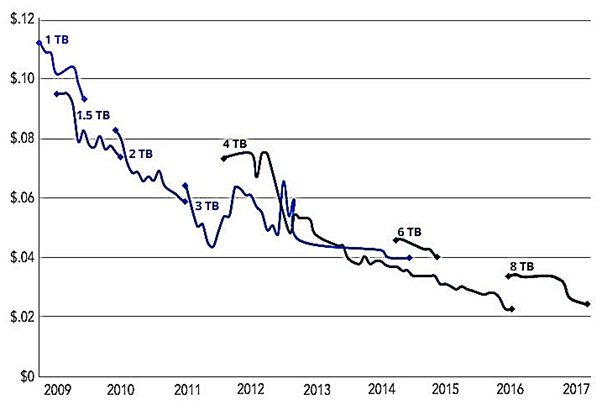
It’s always better to get a small size SSD and a large HDD.
- SSD — Datasets in use + OS (Costly! Min: 128 GB Recommended)
- HDD — Misc User Data (Cheaper! Min: 2 TB Recommended 7200RPM)
5) GPU
GPUs are the heart of a Deep Learning Build. They decide the performance gain that you get during training.
TL;DR advice for choosing GPU (Inspired by Tim Dettmers):
- Best GPU overall: Titan Xp
- Cost efficient but expensive: GTX 1080 Ti, GTX 1070, GTX 1080
- Cost-efficient and cheap: GTX 1060 (6GB)
- I have almost no money: GTX 1050 Ti (4GB)
- I do Kaggle: GTX 1060 (6GB) or GTX 1080 Ti
- I am a researcher: GTX 1080 Ti
- I am serious about deep learning: Start with a GTX 1060 (6GB)